

Compliance & Audit
Divertly keeps an audit log of activity in your organization, so you can see who took an action, what the action was, and when it happened.
Privacy and compliance
How Divertly collects, uses, and protects personal data is described in the Privacy Policy at divert.ly/legal. In summary:
- The policy describes the rights available under the GDPR (for people in the European Economic Area) and the CCPA (for California residents), including access, deletion, and portability.
- Divertly doesn’t sell personal data.
- Data is transferred to and processed in the United States.
- Payments are processed by Paddle. Divertly doesn’t store or collect payment card details.
- Domains and targets are screened for risk. See Security & Risk.
For retention and export, see Data Retention & Export. For questions about compliance, contact support.
View the audit log
Find the audit log on the Organization page, below Billing. Each entry shows:
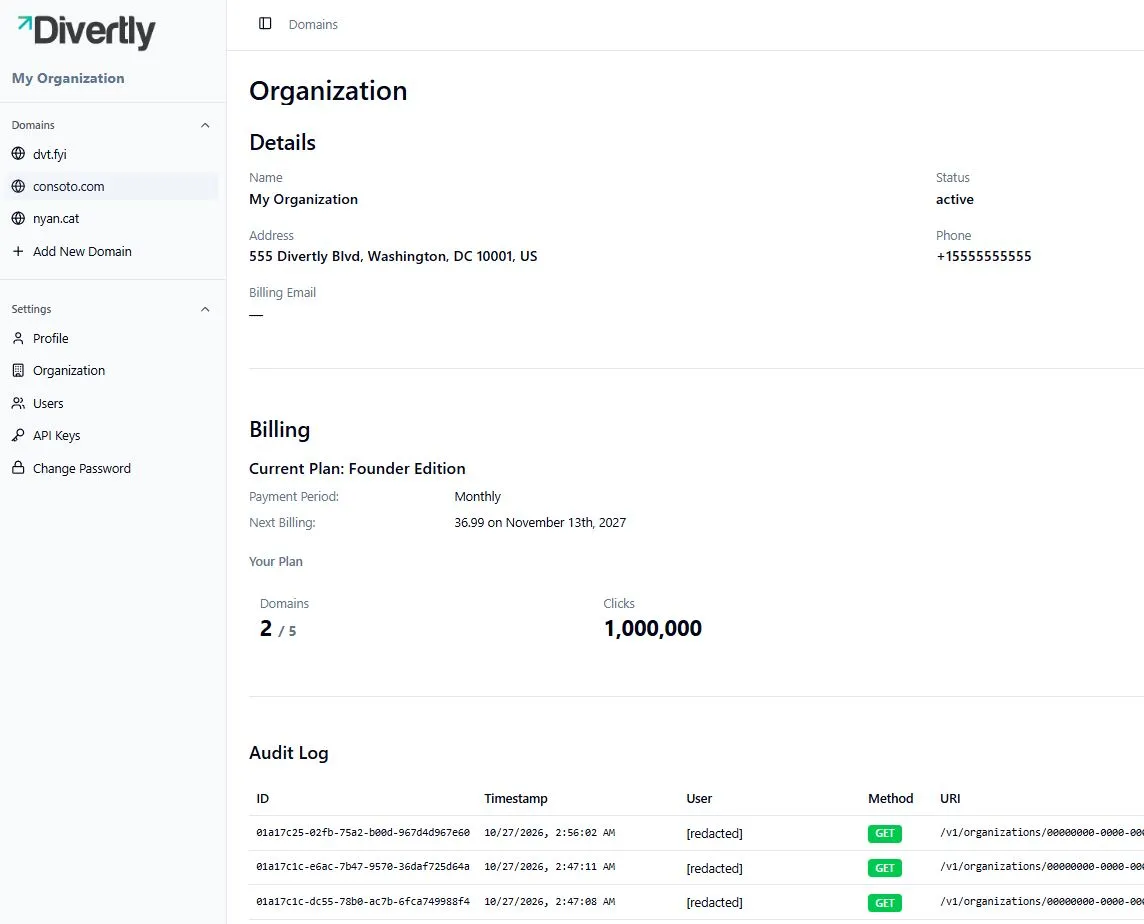
Click any row to see the complete recorded detail for that event. Use the rows-per-page control to show 10, 25, 50, or 100 entries at a time, and page through the rest with the controls below the table.
Retrieve audit events through the API
The same events are available programmatically:
To see the audit history for a single user instead of the whole organization:
See Authentication for how to authenticate these requests.